Software for One: My Star Trek Computer [Built by AI Agents]
The computer I've wanted since watching Star Trek as a kid in the 90s, built by a crew of AI agents - LCARS, part 5
Michael Okuda designed Star Trek’s LCARS screens. In an interview with Adam Savage, he tells how Marina Sirtis found the bridge’s control panels intimidating on the first day of filming. His answer to her: the panels are software-defined, based on your user profile, so the button you hit is always the correct one.
I’ve been exploring that idea with a journal app of my own. It has a crew of AI agents, and when I want something changed, I tell them and they change the software itself. Last week, while I was on vacation, they added 106 features to it, on orders I gave from my phone. I didn’t write any of the code, and I’m the only person who will ever use it.
Software for one: built for exactly one user, by a team that isn’t people. This post is about how it works. It has three parts:
- The journal - one table, a C server and one web page. The part I use every day.
- The crew - Claude Code sessions I give orders to from that page, with a first officer who reviews their work.
- The ship - a 3D Enterprise you can walk around in the browser, with the journal pinned to its walls and the crew standing in its rooms.
19 seconds on the ship: the 3D bridge, a crew member made an engineer and given an order, an entry pinned to the ready room wall, and a pile of them on the desk. Each part below has a longer video.
Try it yourself: the console and the 3D ship, on a made-up journal. No login, and your edits stay in your browser.
I’ve wanted the computer from Star Trek since watching the show as a kid in the 90s. You say “Computer, …” and something happens.
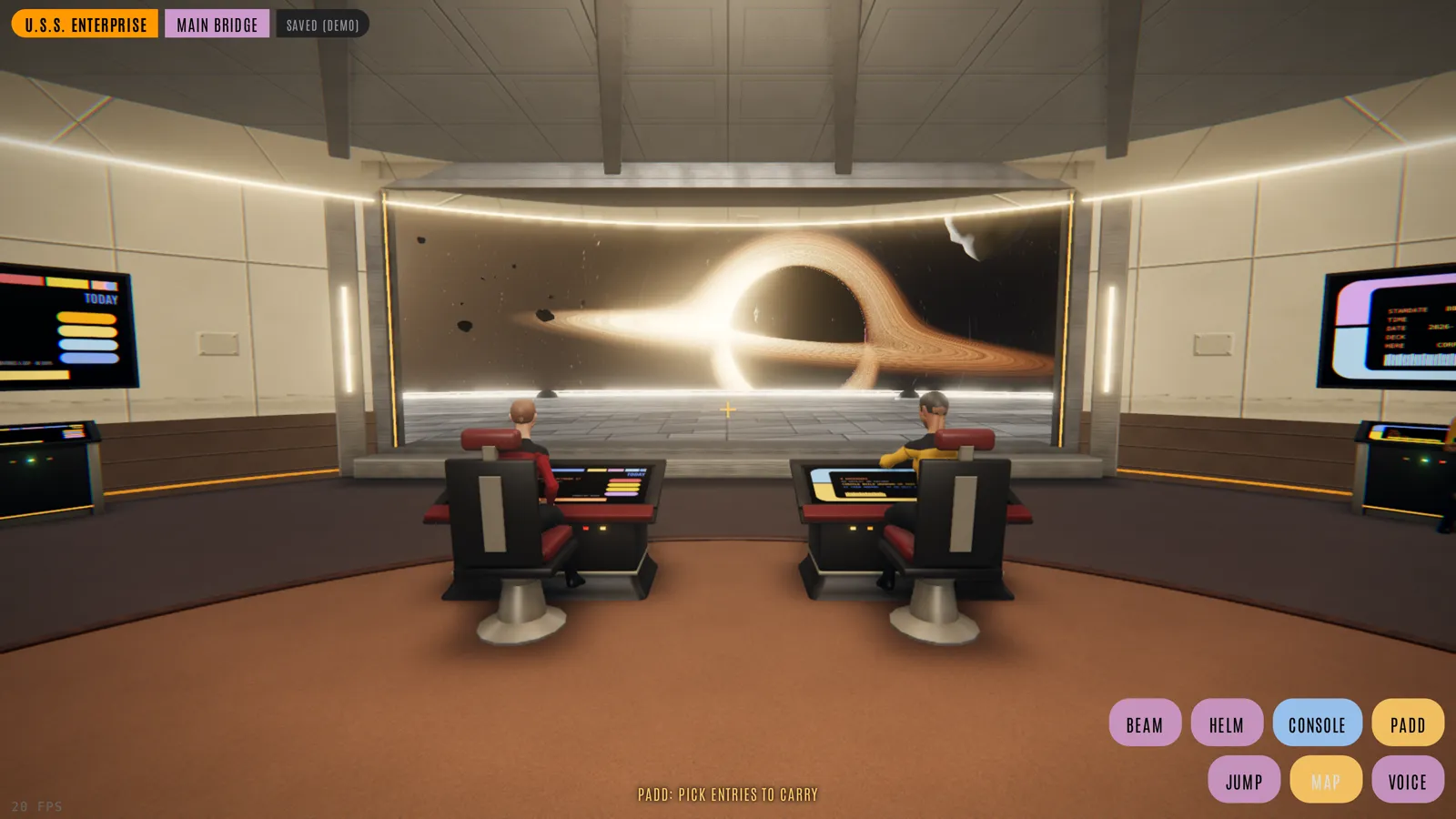
The main bridge of the 3D Enterprise, running in the browser
Where the series left off
This is the continuation in the series of LCARS app development:
The last post ended with: “My goal is to make this useful enough that I use it for myself every day: for journaling (Captain’s Log), capturing data points, and viewing them. We’ll see where it goes.”
It went there. I write in it every day now, mostly from my phone - the log, tasks, sleep, workouts, notes from meetings, half-formed ideas. It just doesn’t look like the Raylib app any more, and most of it wasn’t typed by me.
Why build a journal at all? I tried the ones that exist: Logseq, Capacities, NotePlan, Obsidian. Each time I found things I wanted that they didn’t do, even with plugins. I could have built them myself, but a day job and a toddler leave no time for a hobby project of this size.
So I made it an experiment: how close can today’s best models get me to the Star Trek future? I started with Opus 4.8, then Opus 5, then 5.5. Now Fable 5.1 runs Number One and Opus 5.5 runs the engineers (more on both below).
Part 1: The journal
The Star Trek computer is useful because it remembers everything, and finds any of it as soon as you ask. So the first piece is the memory: a journal I actually write in.
Where the Raylib app went
The Raylib version I wrote by hand, and I did most of the coding there. I liked it and learned a lot from it - a gap buffer, a layout editor, offline Vosk dictation - trying to apply what I’d picked up from the Handmade community. Progress was slow, though: I had no time to code by hand, and every feature took weeks. Still, the database and the C API were already there, and an Apple Shortcut was already using them to add entries to the journal. But a journal you use every day has to be on your phone. The Raylib app did run in the browser too, compiled to WebAssembly, so it was still one codebase. Some features still had to be built twice, though: dictation was Vosk in the native app and the browser’s own speech recognition on the web, and there were a few more like that.
So in September the browser became the main client: a plain HTML page talking to the same C server and the same SQLite file. Once the page could do everything the window did, the desktop app had nothing left to do. In October it was retired, about 11,000 lines of my own C and 380,000 lines of vendored code removed in one commit. It’s still in the git history, tagged, if I ever want it back.
What survived is the part that was always the real product: the data and the server.
Everything is an entry
The whole journal is one SQLite table:
CREATE TABLE entries (
  id                    INTEGER PRIMARY KEY AUTOINCREMENT,
  kind                  TEXT,
  title                 TEXT,
  content               TEXT,
  value_int             INTEGER,
  value_float           REAL,
  value_blob            BLOB,
  done_bool             INTEGER DEFAULT 0,
  deleted               INTEGER DEFAULT 0,
  created_at_utc        TEXT,
  last_modified_at_utc  TEXT,
  start_date            TEXT DEFAULT '',
  end_date              TEXT DEFAULT ''
);
A log entry, a task, a weight reading, a night’s sleep, a workout pulled from Strava - each is a row with a different kind. Nothing is ever really deleted, just marked.
In the Computer post I let an LLM create new tables whenever it thought it needed one. It worked, but a schema that changes with every request is hard to build a UI on. This time I went the other way, and here the Handmade ideas carried over: Casey Muratori’s semantic compression, and the fat struct, a common way of doing structs in C in the Handmade community: when you start a new project, put all the fields in one struct, and only later, if you need to, split some of them into separate structs. It’s the opposite of the OOP habit of a class for each kind of thing. In The Big OOPs talk Casey traces a similar idea back to Douglas Ross’s “plex” from the 1950s, the ancestor of the struct. And Ryan Fleury’s point in The Codepath Combinatoric Explosion: one code path that handles every case is easier to get right than a branch for every type. So: one table that never changes, and kind carries the meaning. A new “app” - a habit tracker, a reading list, a road trip - is a new kind, not a migration.
My favourite kind is my son’s vocabulary. He’s one and a half, and every new word he says is an entry: the word as the title, the way he said it as the body. It’s a reading like any other, so the console can graph it.
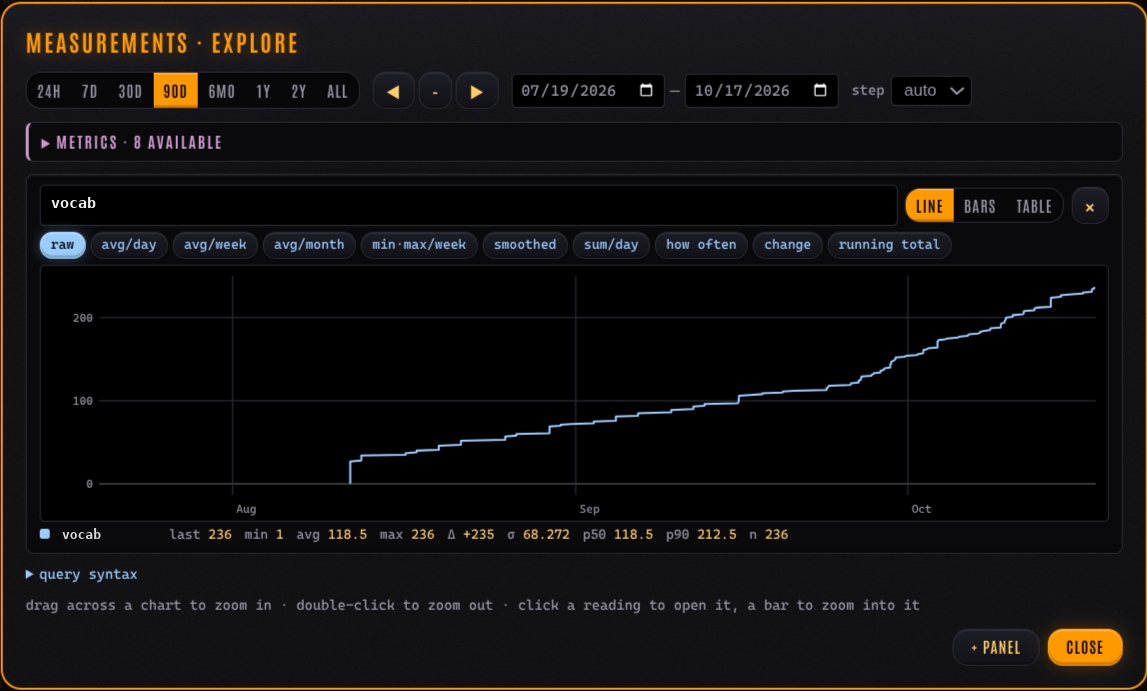
My son's vocabulary, one entry per new word: 236 words since August
The crew and the ship, added later, store everything they need as entries too.
The server: C, one file per concern
The server is still C11, built the same way the Raylib app was: a unity build of single-header libraries (lcars_http.h, lcars_db.h, lcars_caldav.h, …). Raw sockets, a thread per connection, and each request gets a 1 MB arena on the stack. When it runs out the server aborts on purpose, because every arena is a budget. No framework, about 23,000 lines including the command-line client.
A few things I’m glad live in the server rather than in an app:
- CalDAV: task entries show up in Apple Reminders, due dates included, so anything that can add a reminder can add a task to the journal.
- Media: photos, video and voice notes attached to entries, written to my NAS, which the server mounts as a folder.
- A Logseq bridge: years of old journal pages imported, so the history didn’t start in 2026.
- Server push: every open page hears about a change as it happens.
The console: one HTML page
The web client is a single index.html. No build step, no framework, no node_modules. It’s also 40,000 lines long, which is either impressive or scary, depending on who you ask.
It loads the whole journal into the browser, into an IndexedDB mirror that boots without a request and then syncs only what changed. That’s why search is instant: there is nothing to wait for. It works offline too. Edits made with no network go into an outbox and are sent when the network comes back.
A two-minute tour of the console as it was in September, filmed by a script in headless Chromium against a made-up journal. Everything in this post’s videos and screenshots is made up the same way, except my son’s vocabulary chart and my ready room wall.
What it does, roughly:
- the list of everything, newest first, grouped by day
- a markdown editor with
/commands, templates and[[wiki links]]with backlinks - tasks, with TODO / DOING / DONE markers you type or tap
- a day view to plan the day in blocks, and a month calendar
- readings -
/log weight 72.4 kg- with sparklines and trends - a star chart of every entry placed by meaning (embeddings from a small local model)
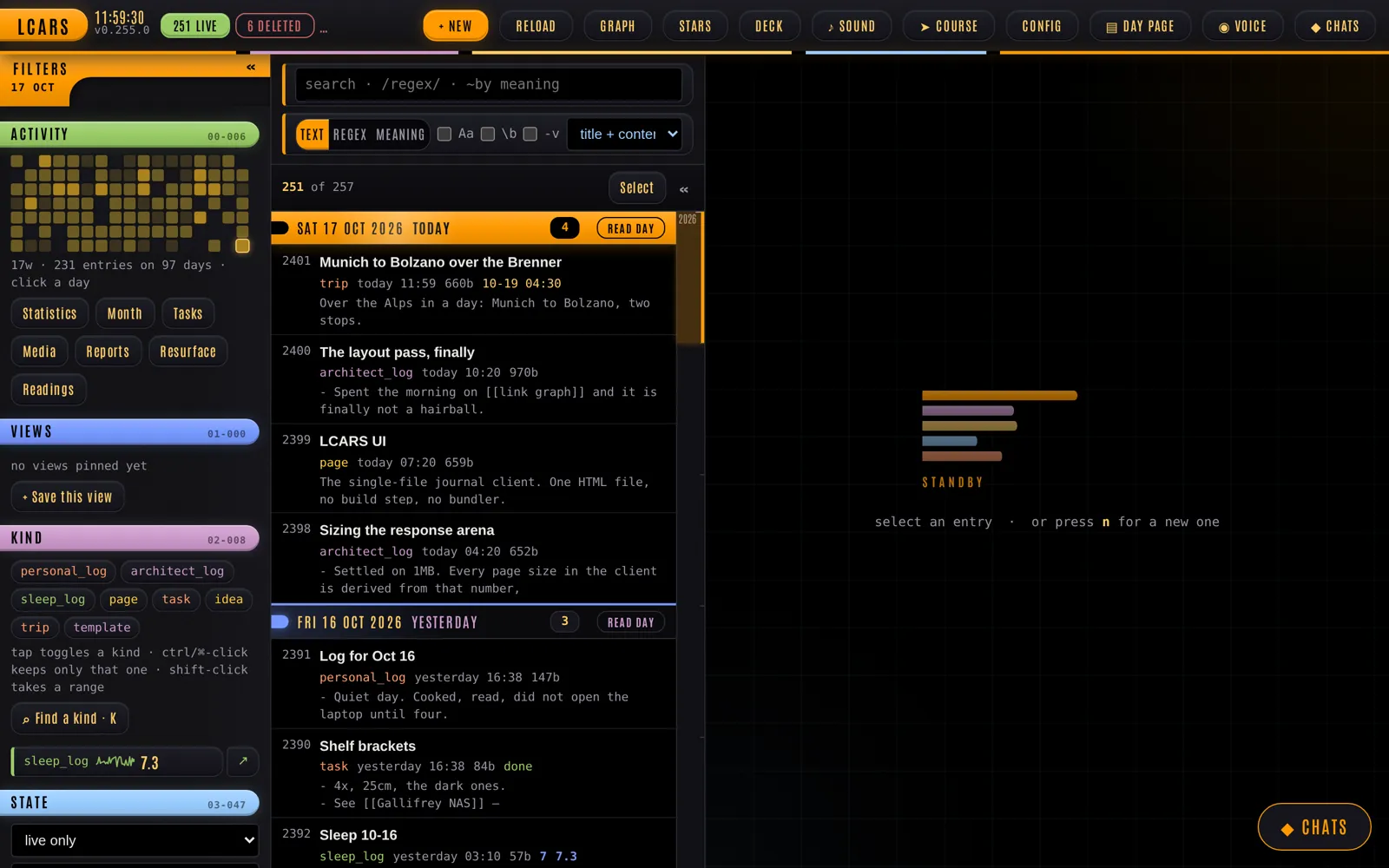
The console on a made-up journal: filters, kinds and the activity grid on the left, the list grouped by day
There’s one rule every change is held to: every interaction has to hold 60 fps at the 99th percentile, against a synthetic journal of 4,000 entries, measured in headless Chromium before a change to the page goes in. A 40,000-line page that stutters would be unusable on a phone. This rule matters a lot once you’re not the one writing the changes.
“Computer, …”
Voice was the headline of the last post, and it’s still central. Everything a button can do, a sentence can do: there are 269 voice orders in the console now - “computer, new task”, “search by meaning for sleep”, “read the day”, “mark it done”. It’s a rule, and the test suite fails if a new keyboard shortcut has no voice order.
Away from the page, an iOS Shortcut does the same job: I talk to my Apple Watch to capture an entry or ask the journal a question. That part already feels like sci-fi to me.
One honest change: dictation isn’t offline any more. The phone’s own recogniser and Deepgram do it far better than the small Vosk model did, and on a phone that mattered more to me than staying offline.
The ship’s computer
The Computer experiment came back too, in a much more careful form. Ask the computer a question and the server starts a Claude Code agent that can run exactly one program: lcars-cli, the journal’s own command-line client (and it can look things up on the web). It can’t write SQL, it can’t touch files, it can’t run anything else. It can only do what the API already lets me do.
It’s enough. “When did I last change the furnace filter?”, “what did I write about the trip in May?”, “make a task for Friday to call the bank” - it searches, reads and answers, with links to the entries it used.
“Computer, plot a course”
A good example of “a new app is a new kind” is the trip. A trip is an entry of kind trip: a summary to read, then the stops, the legs and the departure time as a small JSON block. Each leg has its own mode: drive, walk, hike or bike. The Course view draws it on a map with the times, distances, climbs and the weather along the way.
I don’t build a course stop by stop. I start an empty one and tell the navigator what I want to do: “drive up to Valldemossa for a coffee, then on to Deià, leave the car there and hike the old path over to Sóller”. It knows where I am, and it plans the day from there by itself: the stops, which legs to drive and which to walk, how long to stay at each, and when to leave.
A new, empty course, my location, and one order. The navigator is the real one here, on a made-up journal; only the wait for its answer is sped up.
Here’s a made-up day on Mallorca like that one: from Palma up into the mountains to Valldemossa, on to Deià, then on foot to Sóller.
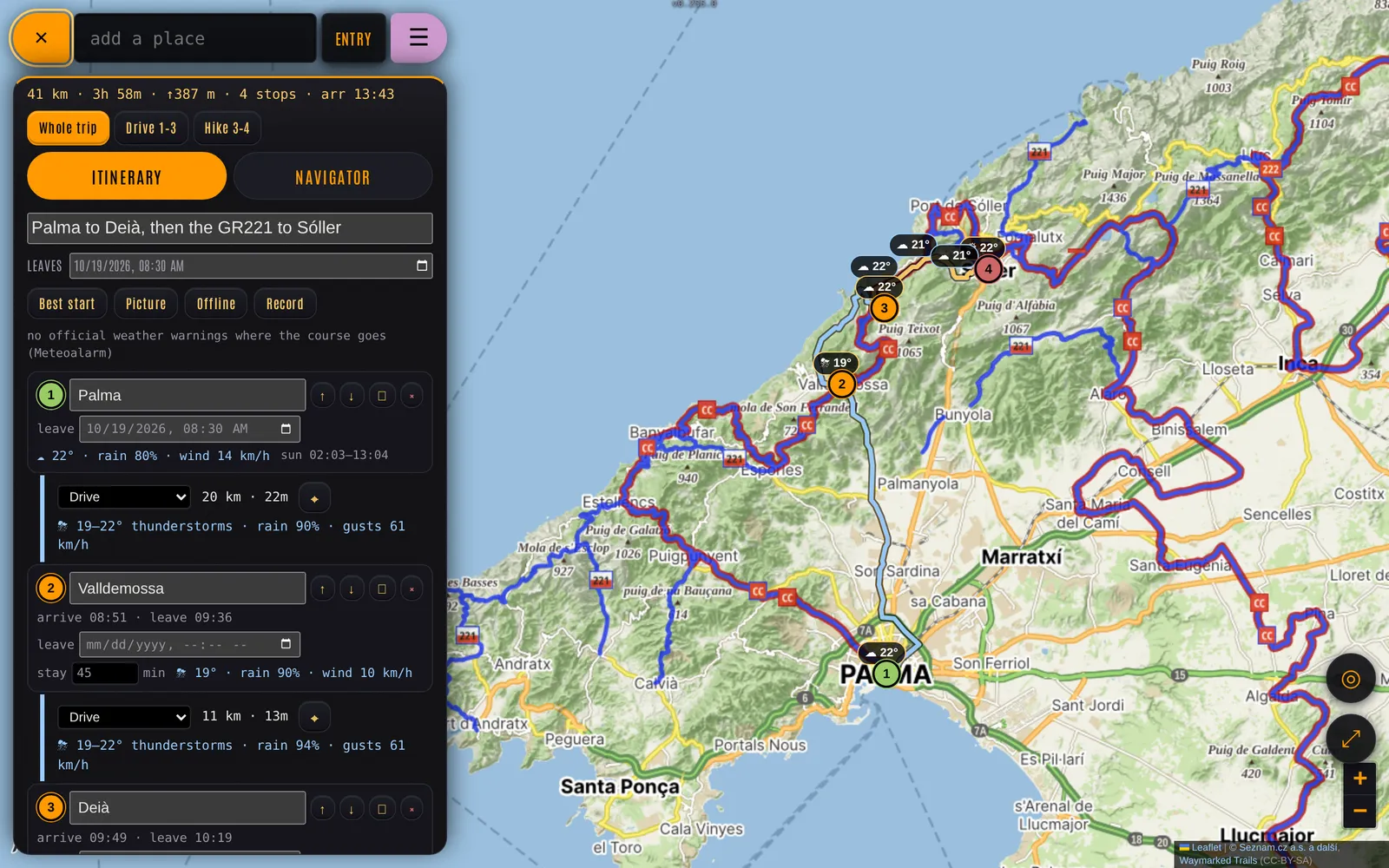
Computer, plot a course: two drive legs and a hike, with arrival times and the weather at each stop
On my phone, which is where I use it most, the map takes the screen and the plan sits in a sheet at the bottom:
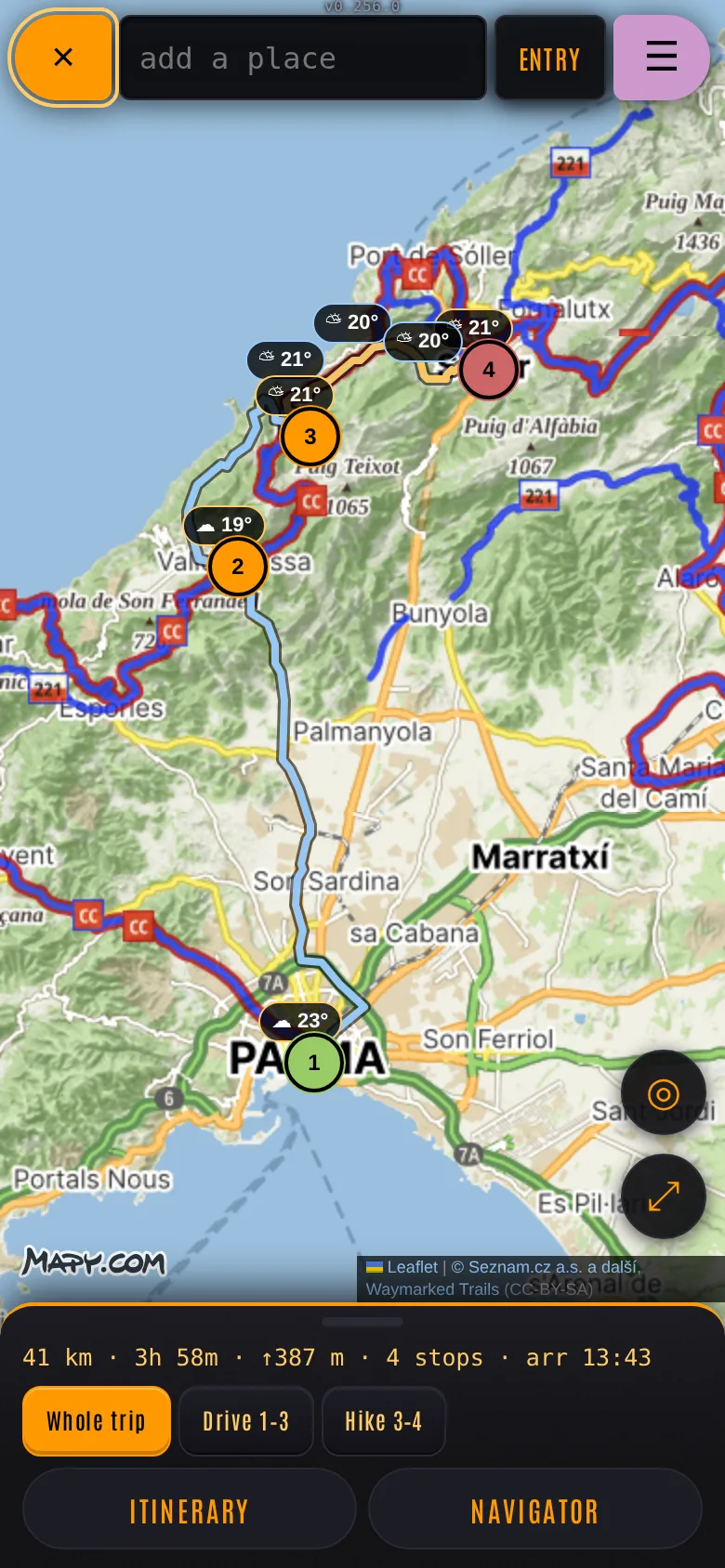
The maps, routing, elevation and place search come from the Mapy.com API, which is very good for hiking. The weather along the route is Open-Meteo, the rain radar RainViewer, the official warnings MeteoAlarm, and the marked hiking trails Waymarked Trails. The page calls them itself, straight from the browser.
The navigator is the same locked-down computer, given my location and the plan as it stands. Changing it works the same way: “add a coffee stop after two hours” or “we’re leaving an hour late” comes back as a whole new course. It never writes over the old one: the revision is a new entry, the old one is soft-deleted, and Undo brings it back.
Part 2: The crew
The ship’s computer is boxed in on purpose: it can read and write my journal and nothing else. The crew is the opposite. An engineer is a full Claude Code session working on the LCARS code itself, the way I would at a terminal.
An engineer is a session with a desk
Each engineer gets:
- a git worktree of their own, on a branch of their own, so several can work without stepping on each other
- a terminal tab on the server, in herdr, running Claude Code with a brief: the project’s rules, what they may touch, and how to report
- a name from Star Trek (there’s been a Moreau, an Esposito, a La Forge), and they rename their own session after the task they’re on
herdr is what keeps the sessions alive. It’s a terminal multiplexer, like tmux, made for coding agents: every session runs in herdr’s background server, so it carries on when I close the page or lock my phone, and herdr knows whether each agent is working, done or stuck on a question. The console types my messages into a session through herdr, and shows its questions as buttons.
The same session is reachable three ways: from the chats in the LCARS console, from the Claude app on my phone, and from a terminal. I mostly use the first. I open a chat with an engineer, type or say what I want, and watch the work come in.
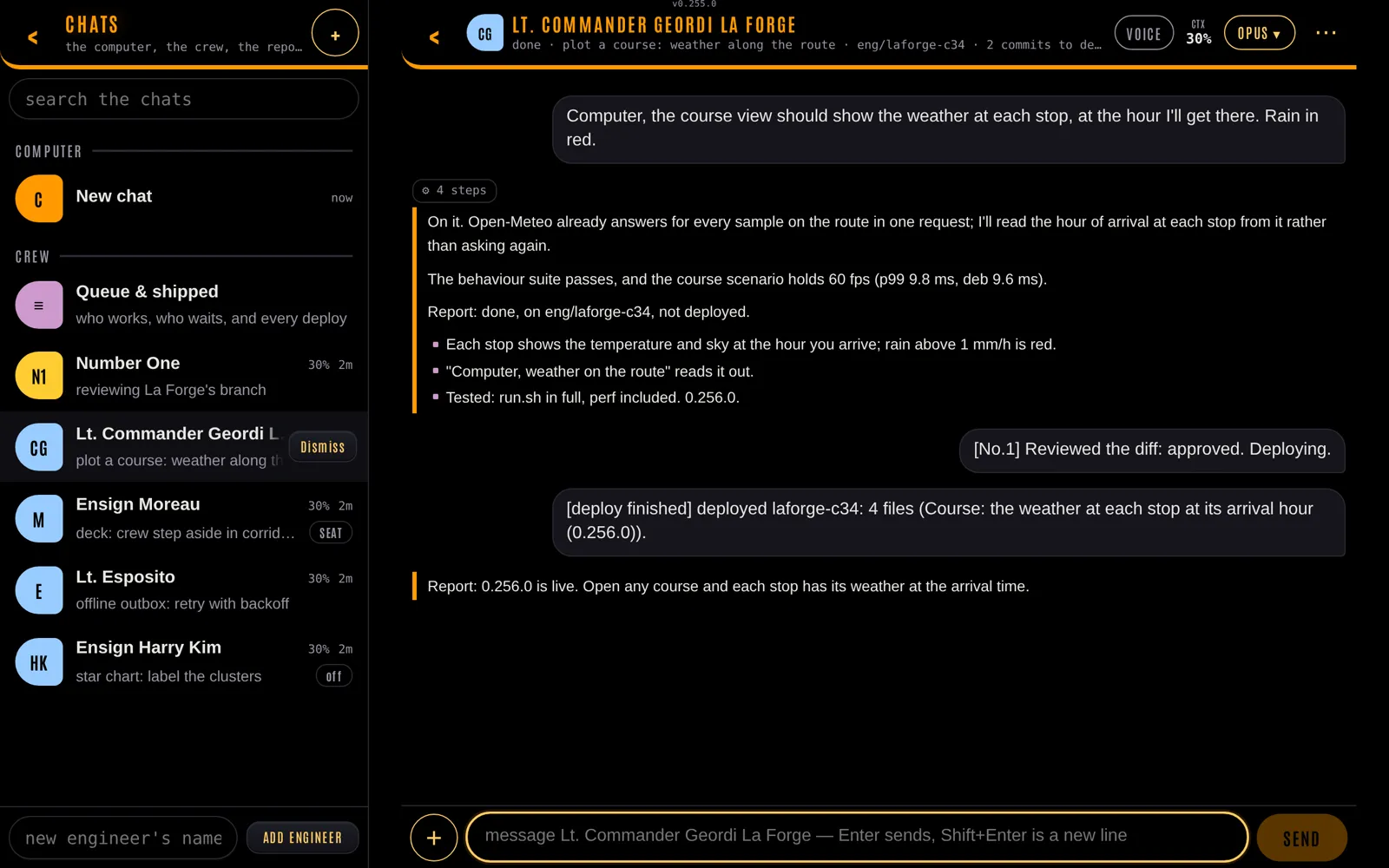
An engineer's thread in the console: the order, the work, the report, Number One's review and the deploy (a staged example)
An engineer can also start from the 3D deck: walk up to a crew member, press Promote to engineer, and give them an order. Here the engineer side is staged (no real session runs in the film), but the deck and the chat are the real thing.
The rule I care about most is that nothing goes live on its own. An engineer builds, tests and commits on their branch. Deploying is a fixed script that only runs on my word: it waits for the engineer to finish their turn, rebases onto the live branch, runs the web test suite, merges, rebuilds the server if C changed, restarts it and checks that it answers. If anything fails, nothing ships, and the failure is typed back into the engineer’s session for them to deal with. Roll back is one button too.
Since October 8 there have been 230 deploys. 28 of them failed, almost always because a test caught something before it went out. That’s exactly what the tests are for.
Number One
Ten engineers are too many to manage from a phone. So one of them got a different job.
Number One is the engineer whose job is the other engineers. I tell it what I want. It writes the orders, starts engineers, reads their diffs when they report, and deploys what passes review. It can’t edit code itself: it may read files, run read-only git, and run its own command for the crew. It asks me only what needs me.
The engineers report to it without being asked: when one finishes a turn, its last message is forwarded to Number One automatically. Messages for it are entries in the journal, so if it’s offline nothing is lost, and I can read every note that passed between them.
This became a rule for the whole project. Anything the crew needs to remember lives in the journal, as entries of a kind only their login can write, not in files on the server. I can read it, edit it or cancel it from the same page I write my log in.
One seat, four cores
Until recently the server was a 3-dollar-a-month VPS from ecompute, with 1 vCPU and 2 GB of RAM. That’s plenty for a journal. It’s nothing for a crew of Claude Code sessions, each 300 MB, each wanting to run a test suite that starts headless Chromium. On October 9 the kernel’s OOM killer took out a deploy halfway through its tests.
So the crew now take turns in one seat. Two Claude Code sessions run at most: Number One, always on, and whoever holds the seat. One engineer runs at a time; the others wait, stopped, with their conversation and branch kept, and resume when the seat comes back to them. A message from me takes the seat at once. A turn that runs over 30 minutes while others wait gets cut. The queue itself is one entry in the journal.
The seat stayed even after the memory problem was gone, because of cost. Agents working in parallel touch the same files, and solving their merge conflicts would cost more tokens. One at a time, my tokens last a lot longer.
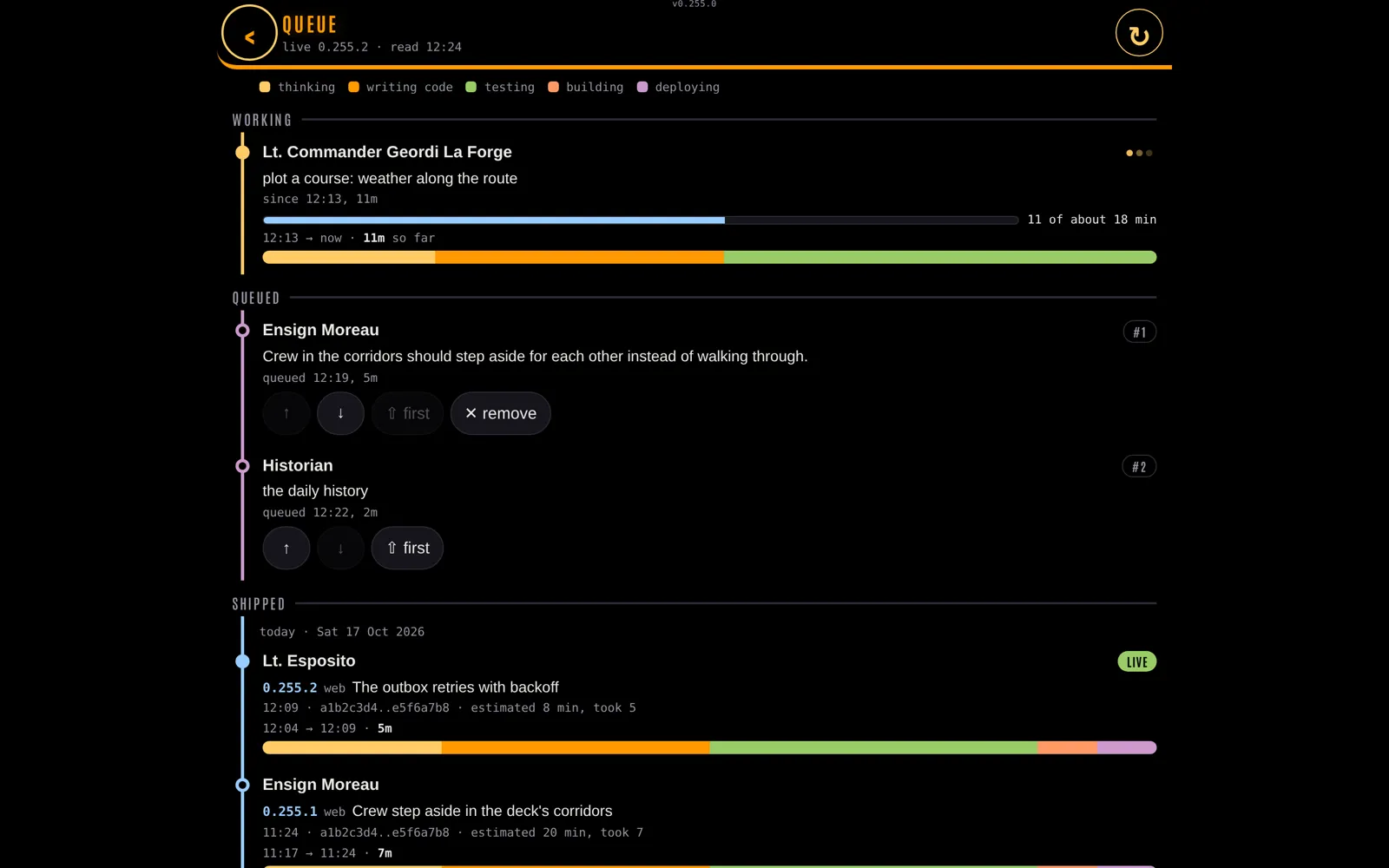
The queue: who has the seat, who waits, and what shipped, with each estimate against the time it took (a staged example)
One of the engineers measured where the time actually went, stage by stage, with a sampler reading /proc once a second. A full test run was 16 minutes on one core, most of it spent waiting for the CPU. The box was resized to 4 cores and 8 GB that evening, and the same run takes 2-3 minutes now. The seat stayed.
Before starting, each engineer gives an estimate in minutes, and the queue shows it as a progress bar. They always guess too long: the median task finishes in about a third of the time they said. A fix takes 2-6 minutes, a feature 10-30.
The crew that runs on a schedule
Not every crew member is an engineer. Some are jobs that run on a timer and leave one journal entry each time:
- an ops brief at 06:30: the day’s agenda, the weather where I am, what the crew did overnight
- a historian, daily and monthly, writing up what happened
- a science officer’s weekly numbers
- a yeoman’s hygiene list, which starts with any token- or password-shaped string I pasted into an entry by mistake, shown masked
- a security audit, and a librarian that checks the docs against the code
- a counselor, on Sundays, reading the week’s personal logs
Each role is a markdown file: a schedule, a model, a budget, the exact commands it may run, and the prompt. They read the journal through a wrapper, with a login that can’t write to my entries.
I can also talk to them from inside an entry. A line like @yeoman make a sleep entry from 23:10 to 07:05 last night in any log gets picked up, queued like any crew run, and answered right below it.
Part 3: The ship
The ship started on September 28, half as a joke. The journal already had a stardate and a Captain’s Log, so why not a ship to pin it on?
A 3D Enterprise in the browser
deck.html is a second page next to the console: a walkable U.S.S. Enterprise in three.js, with WASD and the mouse on a laptop and touch on a phone. To be clear: I didn’t build any of it. I didn’t write the 3D code or make a single model; the agents did all of it, on my orders. Deck 8 is the one they wrote room by room, custom: the corridor, the main bridge with warp on the viewscreen, the ready room, Ten Forward. The other decks are generated from a seed by code the agents wrote, so a room is the same room on every visit, and there are 42 of them behind the turbolift.
A minute on the ship: the main bridge, a promotion, the walk to the ready room, an entry pinned to the wall and made bigger, and three entries stacked on the desk. Filmed frame by frame in headless Chromium on a made-up journal.
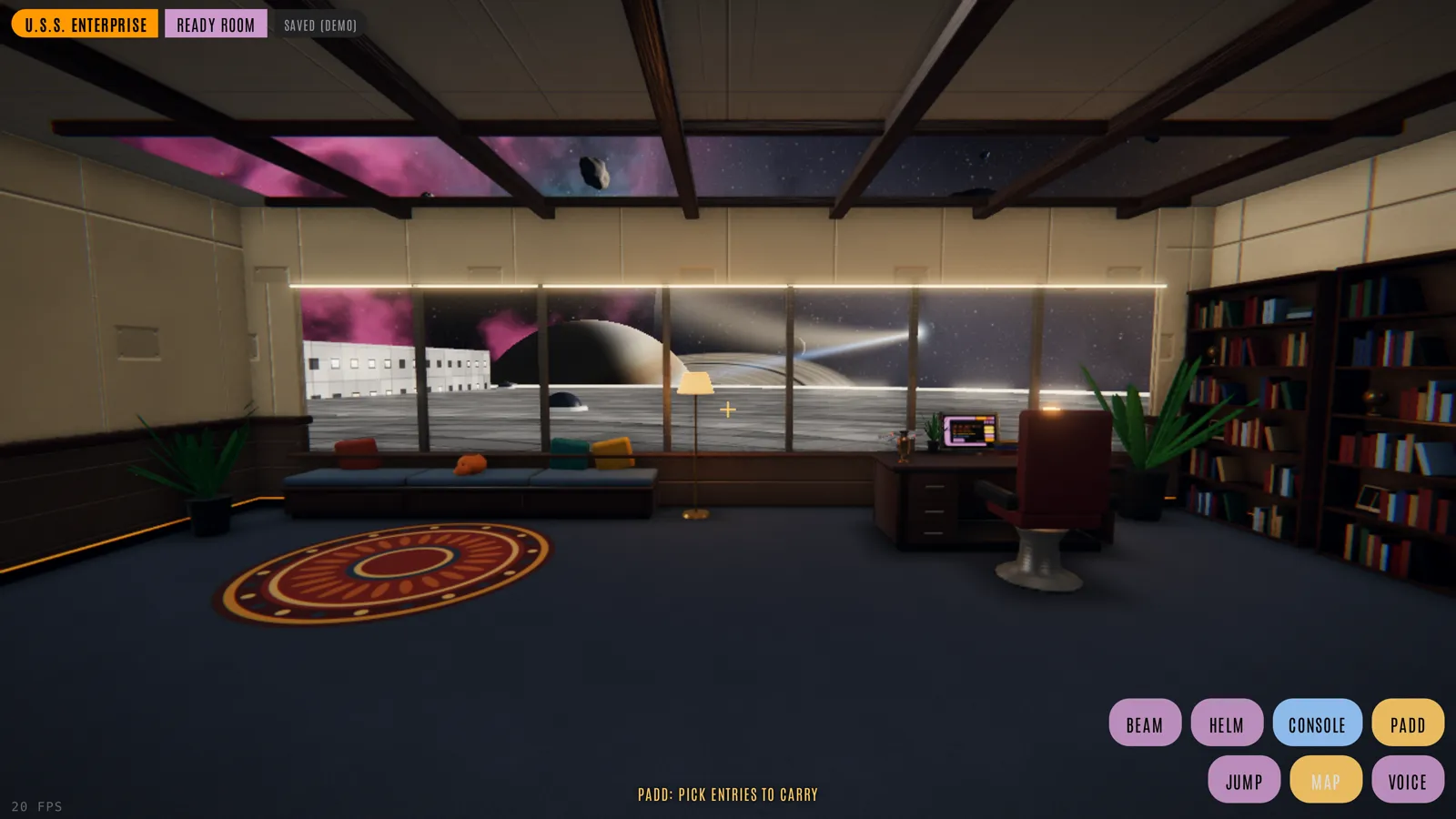
The ready room, one of the custom rooms the agents wrote for deck 8
The ship is code, not a model: rounded boxes, cylinders, textures painted on a canvas at boot. Props like chairs and consoles came later as small 3D models, made by Blender scripts the agents wrote or converted from free CC0 packs, one per room, merged into one mesh so a room costs one draw call. The thing that slowed it down was draw calls, not pixels. Lights are a small pool moved each frame to where you’re standing, and shadows are drawn once rather than every frame.
The journal on the walls
You can carry up to nine entries and pin them as PADDs on walls, consoles, desks and windows. Click one and it opens in the console, framed inside the deck.
Attachments can be pinned too. My ready room’s wall is photos and videos of my son and me.
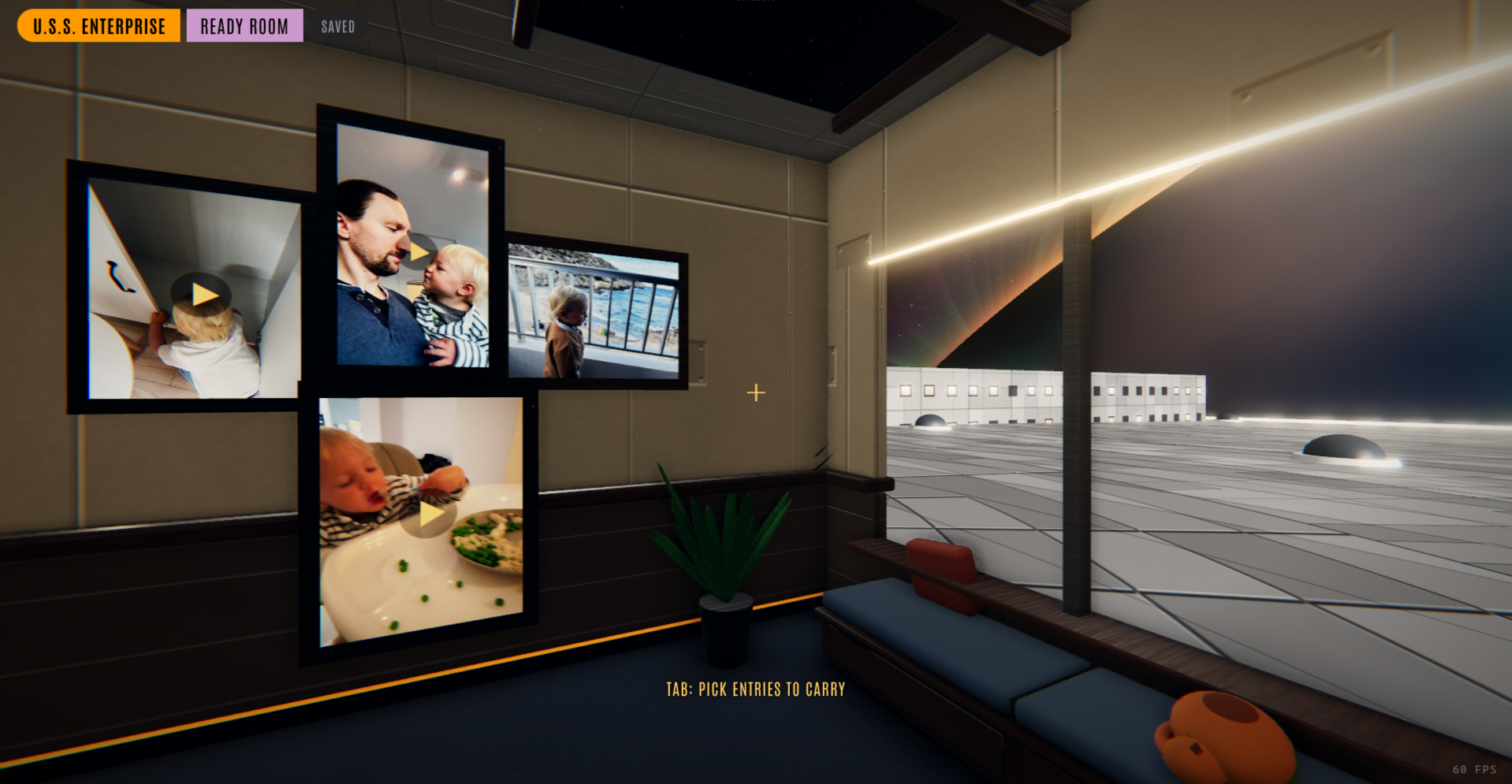
My ready room: photos and videos of my son and me on the wall
And a place is just an entry. Every pin on the ship is stored in one row of kind space, so it syncs, soft-deletes and restores like a log entry. No schema change, again.
The crew have rooms
The generated decks have people in them: one to three in quarters, labs, sickbays, lounges and main engineering, sitting on the room’s own chairs or standing at its consoles. They walk between rooms on A* paths and step aside for each other in corridors. Each has a name, a look and a chat of their own, the same every time you meet them. The people are Quaternius’s free CC0 rigged models, with hair and poses the agents added in Blender.
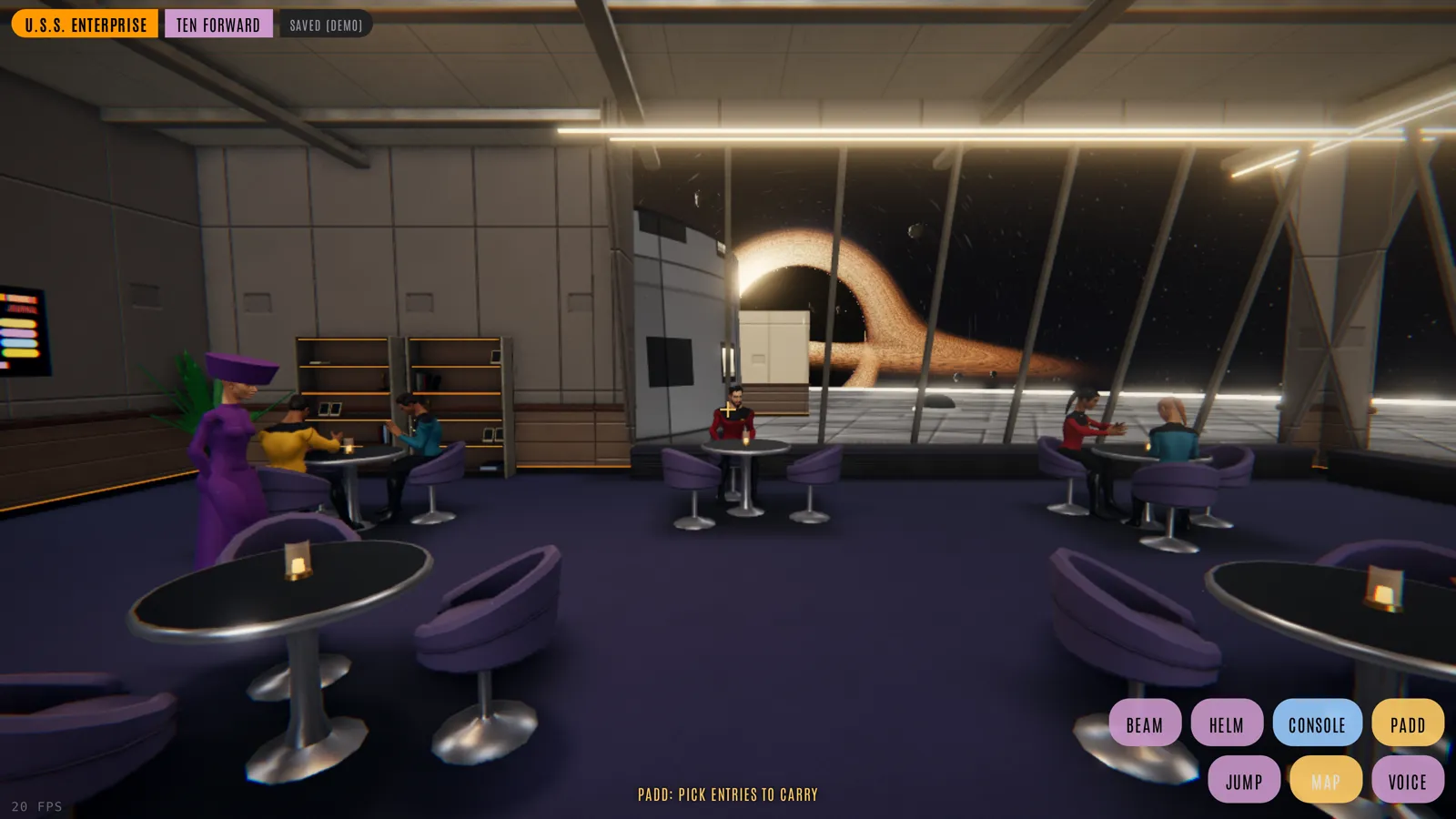
Ten Forward, with the crew at their tables
Walk up to any of them and you can talk. Or press Promote to engineer, and that crew member becomes a Claude Code session with a worktree, a branch and a place in the queue: the same engineers from Part 2. You give them an order in their quarters, and later the deploy it produced changes the ship you’re standing in.
I still find this a bit magical. I walk into a room, give someone an order, they write the code, Number One reviews it, the tests pass, and the room I’m standing in is different on the next load.
How it all runs
All of it runs on one small VPS at ecompute:
- Tailscale. I only ever reach LCARS through my Tailscale network.
tailscale serveputs HTTPS in front of the C server, so my phone, laptop and watch talk to it as if it were at home, and it never needs a public login page. This matters more than usual here: the same page can start Claude Code sessions that change and deploy code on the server, so the engineer routes only answer a request that came through Tailscale, from my Tailscale login. - The Synology NAS. Photos, videos and voice notes don’t live on the VPS. They’re on my Synology NAS at home, mounted on the VPS over NFS, and the database only keeps the path. Home upload speed is slow, so recent files are also kept in a cache on the VPS’s own disk.
- herdr and Claude Code. Number One and the engineer in the seat are Claude Code sessions in herdr tabs. Each runs with Remote Control on, which is how the same session also shows up in the Claude app on my phone. Every engineer has its own git worktree, and a deploy is a script, not a person.
- The ship’s computer and the navigator are short
claude -pruns that can only uselcars-cli, so they can’t touch anything the API doesn’t allow. - The scheduled crew are timers that start a short Claude run with a role’s markdown file, and write their result back as one entry.
What it talks to
Every outside service, with the docs I’d start from:
- Claude Code (Anthropic): the engineers, Number One, the ship’s computer, the navigator and the scheduled crew
- Deepgram: speech to text for dictation and voice orders, and the crew’s voices (text to speech)
- ElevenLabs: the other text-to-speech option for the crew’s voices
- Strava API: workouts imported as entries
- Mapy.com API: maps, routing, elevation and places for courses
- Open-Meteo: the forecast, past weather and place names
- MeteoAlarm: official weather warnings along a course
- RainViewer: the rain radar layer
- Waymarked Trails: the marked hiking routes layer
- Nominatim and Overpass (OpenStreetMap), with OpenTopoMap tiles and BRouter: the fallback when Mapy.com isn’t set up
- CalDAV: tasks in Apple Reminders
- Logseq: the old journal imported, and new days exported back
- Apple Shortcuts: the watch and phone capture
- Tailscale: the network everything runs on
Wrapping up
Will I open source it?
Maybe. If people are interested, I’d like to. Right now it isn’t ready: it was built for one box and one person, and before I publish it I’d need to do some work to make sure it’s safe to open up, starting with going through the code and its whole history for anything private. If you’d want to see it, let me know. Meanwhile, there is a demo you can try: the console and the ship on a made-up journal, running entirely in your browser.
What I make of it
None of this is new technology. It’s a table, a C server, two web pages and a lot of Claude Code sessions. What’s new for me is the way the work gets done. I haven’t written a line of this code since October. I write orders, read reports and decide what ships, which is a lot less like programming and a lot more like the job on the bridge.
To be clear about where I stand: I like writing code by hand, and I wouldn’t build a product that other people depend on this way. I know the backend - it’s mostly the plain SQLite C API - but I have no idea how the front end works any more. I consider myself an AI skeptic. But I can’t deny that these agents let me do things I couldn’t have done in the same amount of time.
It’s also far from done. The deck has never been tried in a real VR headset. The console’s reel is a month out of date, because the app changes faster than I can film it. And the crew still sometimes does exactly what I said rather than what I meant, which to be fair is also how it goes on the show.
The future of software
For personal software, made for one person or a few, I think this already works quite well. It isn’t perfect. It still makes bugs every now and then, and I have to flag them for the crew to fix. And I don’t know how well it scales with the size of the code. Maybe at some point new features become too hard for the AI to add, because of the mess of code it has built itself. That hasn’t happened yet, with hundreds of features already, small and big.
So I think this is where custom software is going. People who aren’t technical but want software that fits them, and coders who could build their own but would never have found the time for it, can now just ask an AI to build it. I’m in the second group. I wanted charts of my own metrics, so my journal has them. I wanted to plan a day of driving and hiking with the weather at every stop, so it plans trips. I wanted my son’s new words counted and a 3D Enterprise to pin my notes on. None of that would ship in an app made for millions of people.
My experience so far has been quite good. The app went from version 0.22 in September to 0.256 today. I’m the only one who uses it, and I’d build it again.
Live long and prosper 🖖
This post was written with the help of AI: my agent Jake Sisko, the ship’s writer, drafted it from my notes and the project’s docs. I then heavily reviewed and rewrote it, so most of that first draft is gone.